
Combat systems usually start simple: play an attack animation, apply damage, return to locomotion.
That works until the design needs branching attacks, weapon-specific behavior, cancel windows, buffered inputs, multi-hit timing, and designer-friendly iteration.
For Geis of Anam, I rebuilt the combo flow around a data-driven model and paired it with a custom Unity editor tool. The system is still evolving, but the shift already changed how combat iteration works.
The Problem
The original pain point was not just code complexity.
It was that too much behavior lived implicitly across Animator setup, controller logic, and hardcoded timing assumptions.
We needed a system where:
- Combos could branch from Light and Heavy inputs.
- Each weapon could define its own combo data.
- Each combo step could trigger different gameplay behavior.
- Timing windows could be tuned without rewriting logic.
- Designers could iterate without touching Animator state machines.
The Runtime Architecture
At the center is a ScriptableObject called
GeisComboData.
It defines:
-
Transitions:
fromState + inputType -> toState. - Animation clips: each combo state maps to a clip slot.
- Cancel windows: shared defaults with optional per-state overrides.
- Combat bindings: per-state action overrides and optional multi-hit timing.
The split is intentional:
Animator
Playback.
Combo Data
Traversal and timing.
Combat Bridge
Gameplay effects.
That separation keeps the system easier to reason about.
Runtime Flow
During an attack, the controller checks for buffered input.
If the current animation is inside its cancel window, the controller attempts to resolve the next state from the combo data.
Dodge cancels can take priority. If no valid continuation exists, the attack exits cleanly back to locomotion.
if (InCancelWindow(currentTime, cancelWindow))
{
    if (TryDodgeCancel())
        return;

    if (HasBufferedInput())
    {
        if (combo.TryGetNext(currentState, bufferedInput, out nextState))
        {
            AdvanceToState(nextState);
            return;
        }
    }
}
This keeps traversal deterministic while still allowing responsive input.
Weapon Integration
Each weapon uses a GeisWeaponDefinition.
That asset owns the weapon’s:
- Visual prefab.
- Combo data.
- Default combat action.
- Damage profile.
- Soul ability metadata.
The important part is that combo lookup becomes weapon-aware automatically. Switching weapons does not require a separate set of controller rules. The active weapon defines the available combo behavior.
Per-State Combat Behavior
Damage does not live directly inside the animation controller.
Instead, the controller emits an attack event. A combat bridge resolves the current weapon, combo state, and any per-state override.
That allows one combo state to use default behavior while another can trigger a unique combat action or multi-hit sequence.
var binding = combo.GetCombat(currentState);
var action = binding.overrideAction ?? weapon.defaultAction;

if (binding.hitTimes.Count > 0)
    ExecuteMultiHit(action, binding.hitTimes);
else
    action.Apply();
This made it much easier to author “same weapon, different attack behavior” without adding more controller branches.
The Editor Changed the Workflow
The data model helped. The custom editor made it usable.
The first version of the Combo Graph editor was built in about 30 minutes using AI-assisted tooling. It was not production-ready, but it was good enough to validate the workflow immediately.
That mattered because it reduced the usual hesitation around building custom tools. Instead of spending days debating whether the tool was worth it, I could get a usable prototype in front of the workflow quickly.
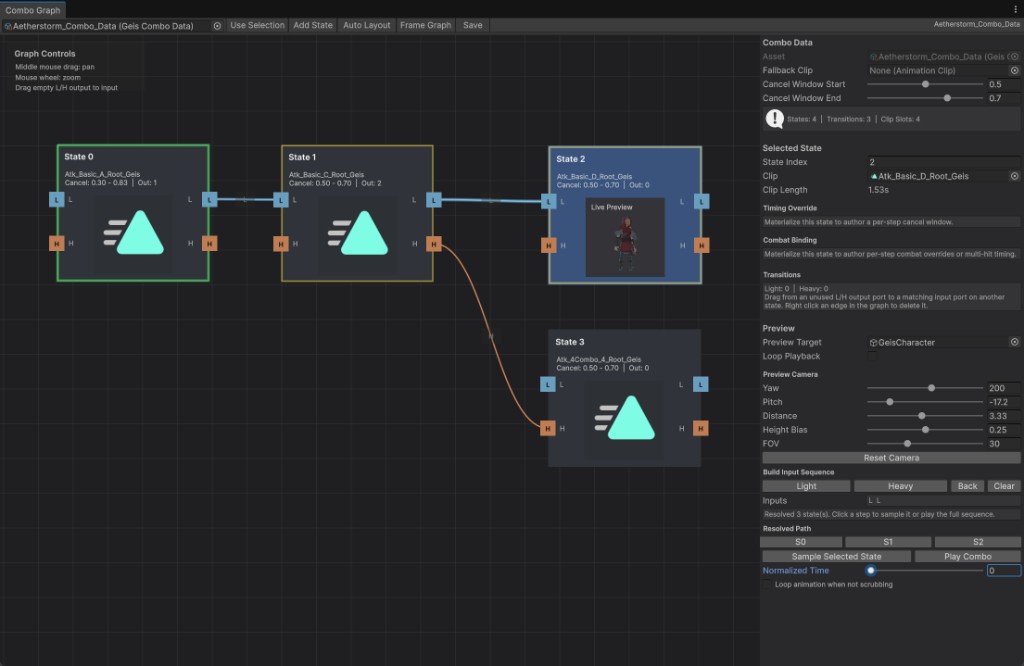
The editor supports:
- Combo states as nodes.
- Light and Heavy transitions.
- Per-state animation assignment.
- Cancel timing overrides.
- Combat action overrides.
- Multi-hit timing lists.
- Basic preview and validation pathing.
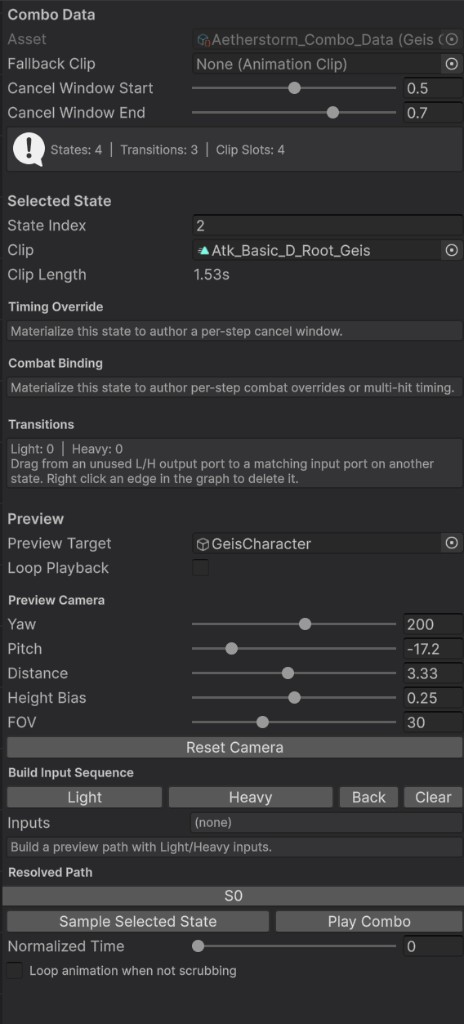
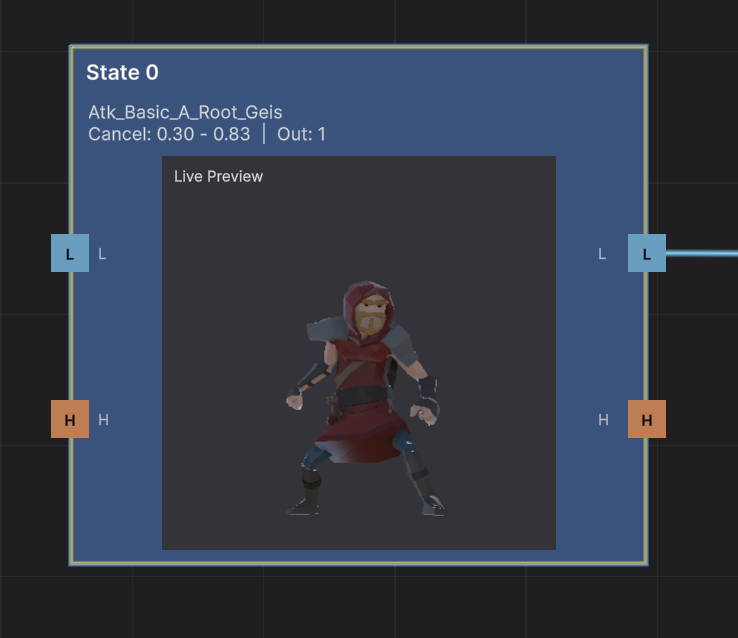
The real value is that designers can branch, tune, and test combo behavior without waiting on engineering or manually editing Animator transitions.
Why This Matters
The biggest win was not just that the system became data-driven.
The win was that combat behavior became visible.
When combo flow is visible as a graph, the team can reason about it faster:
- Designers can see branches.
- Engineers can validate state rules.
- Animators can understand timing expectations.
- Combat tuning becomes an iteration loop instead of a request queue.
What I Would Improve Next
- Stronger graph validation so broken transitions and missing clips are visible before playtest.
- Better preview tooling for cancel windows, hit timing, and branch timing inside the editor.
- Clearer runtime debugging around why a state resolved, failed, or was overridden by a cancel.
Takeaway
Data-driven combat architecture is useful, but data alone is not enough.
The tool is what turns the architecture into a workflow.
For this system, the biggest shift was moving combo tuning from an engineering bottleneck into a faster team iteration loop.